
Upscaling Magical Forest Demo with Arm NSS
Lesson from integrating Arm NSS into our Unreal Engine 5.7 tech demo
Lesson from integrating Arm NSS into our Unreal Engine 5.7 tech demo.
Summary
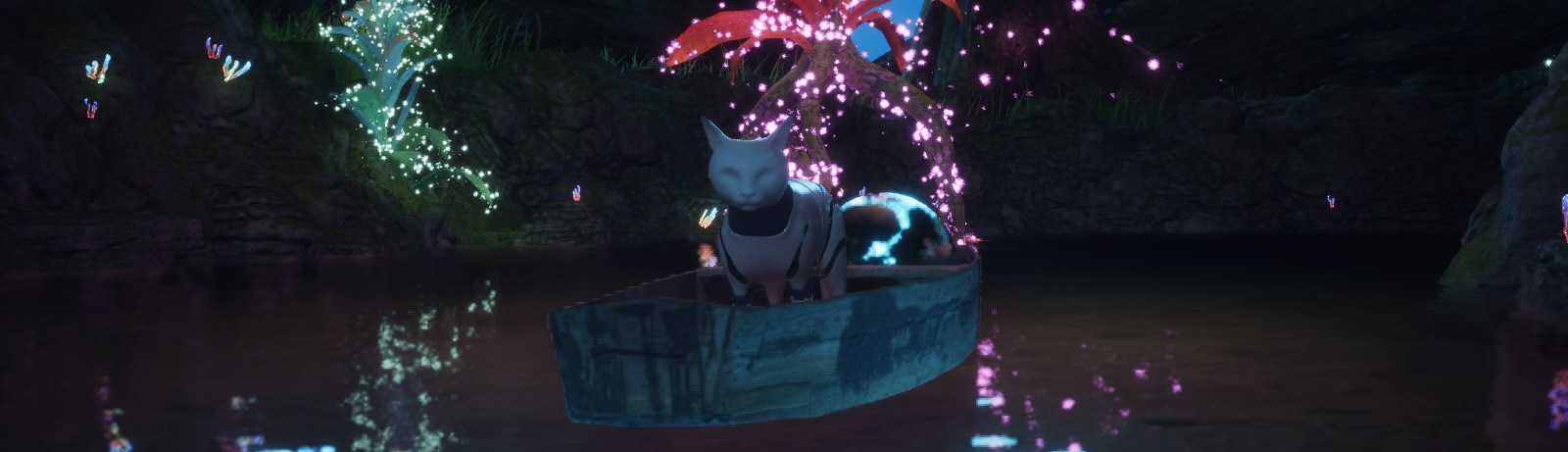
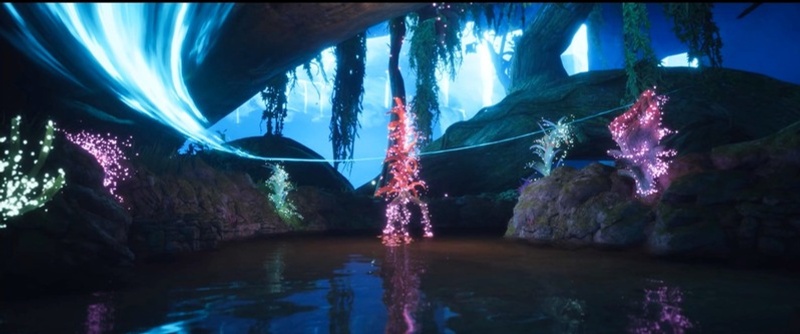
Magical Forest is Meta Meow's mobile neural graphics tech demo. A cat travels through a night-time forest lit almost entirely by glowing plants and AI-generated bridges, with hardware ray-traced reflections visible on the water.
This makes it a difficult scene for any upscaler. Much of the visual detail comes from small, bright features against a dark background, which are exactly the kind of details that tend to disappear when the scene is rendered at a lower resolution.
For this test, we integrated Arm Neural Super Sampling (NSS) into the demo and compared the result with NSS turned off and on at the same input resolutions. The main results were:
- At 50% screen percentage, we render only 25% of the native pixel count. At this resolution, NSS Quality preserves noticeably more detail in the emissive foliage and around the character than the same image with NSS off.
- At 75% screen percentage, the difference between NSS on and off becomes much smaller because more input information is available.
- The improvement is not equally strong everywhere. Ray-traced reflections and water show more mixed results, and neither image fully reproduces the detail of the native-resolution render.
- Early results focus on image quality. The captures were made on Windows using Vulkan ML emulation, so they should not be interpreted as performance results
1.Why we wanted to test neural upscaling
Magical Forest was built to explore how rendering techniques normally associated with desktop and console hardware can be pushed onto mobile devices. The mobile version uses Lumen global illumination with hardware ray tracing and several neural features running at runtime. These include a neural depth-of-field model, 32 independently controlled neural fireflies, and bridges whose geometry is generated from player input.
All of this has to fit into the same frame budget. On our Snapdragon builds, we already render the scene at roughly two-thirds of the native resolution and reconstruct the final image with Snapdragon Game Super Resolution 2 (SGSR2). Upscaling is therefore one of the tools that makes the target frame rate possible, not an optional image-quality feature.
Reconstruction quality directly affects this budget. If we can render fewer pixels without losing important visual detail, that GPU time can be spent elsewhere, for example on better lighting, reflections, or neural effects. But if the reconstruction breaks down, the first things we lose are also some of the most important parts of the scene: small glowing details against dark backgrounds.
Unlike a conventional temporal upscaler, NSS uses a neural network to make some of the decisions normally handled by hand-tuned heuristics. It is also designed to run on dedicated neural acceleration in future Arm GPUs through Vulkan ML extensions, which fits closely with the direction of our own neural rendering work.
Before profiling on target hardware, this evaluation addresses one question:
Does NSS preserve the important visual details in Magical Forest better than the same image rendered with NSS off?
2.How temporal upscaling works
2.1The basic idea
Modern real-time upscalers such as Unreal's TAAU and TSR, AMD FSR, NVIDIA DLSS and Qualcomm's SGSR2 all make use of information from multiple frames. Instead of trying to reconstruct a high-resolution image from one low-resolution frame, they collect samples over time. A simplified version of the process looks like this:
- Jitter the camera. Each frame is rendered with a very small sub-pixel camera offset. The offset changes every frame, often using a sequence such as Halton. Over several frames, the low-resolution pixel grid samples different positions inside each high-resolution output pixel.
- Reproject the previous frame. Motion vectors tell the upscaler where surfaces from the current frame were located previously. This allows it to bring information from older frames into the current one.
- Accumulate samples. The new samples are combined with this reprojected history. Over time, the upscaler can build an image containing more information than any individual low-resolution frame.
- Decide which history is still valid. Objects move, surfaces become visible, lighting changes, and particles appear or disappear. Old information therefore cannot always be trusted.
Trusting history too much produces ghosting and smearing; rejecting it too aggressively produces flickering, aliasing, and blur. Traditional temporal upscalers manage this using carefully tuned rules such as neighbourhood clamping, depth and velocity thresholds, luminance weighting, and masks provided by the engine.
2.2Why Magical Forest is difficult
Magical Forest contains several types of content that are particularly difficult for temporal reconstruction.
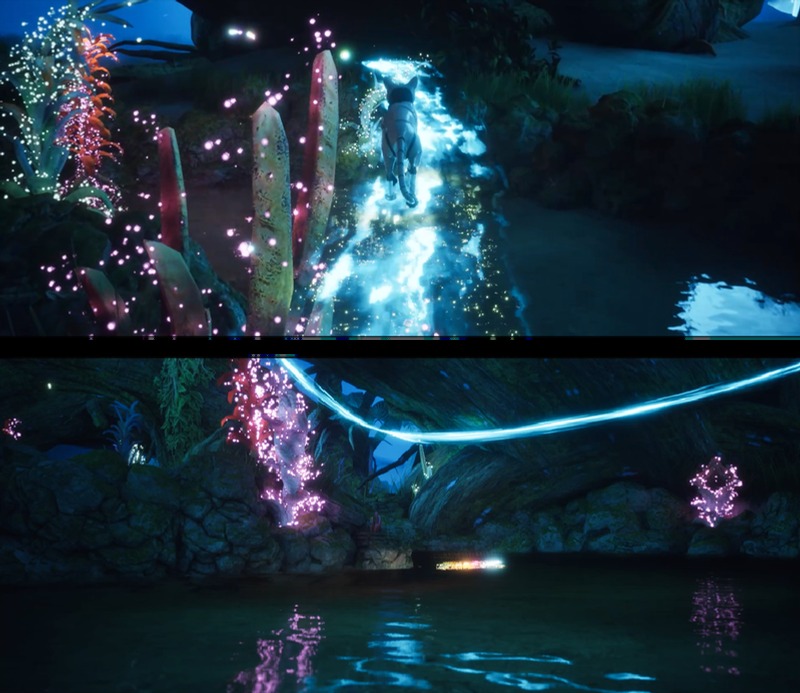
- Small emissive features. Many glowing leaves and petals are only one or two pixels wide in the final image. At 50% rendering resolution, some of them may not be sampled at all in a particular frame. If the upscaler decides that the bright sample stored in history no longer matches its neighbourhood, it may reject it. Several small shapes can then merge into a single soft glow.
- Particles and translucency. Fireflies and magical particles are translucent, and they do not always provide useful depth or motion-vector information. Conventional upscalers often rely on a manually generated reactive mask to stop this type of content from smearing.
- Ray-traced reflections. The surface containing the reflection and the scene being reflected do not necessarily move in the same way. A motion vector describing the water or chrome sphere is therefore not necessarily the correct motion vector for the reflected image. Bright moving highlights are especially difficult to reconstruct reliably.
- Water. Animated surface normals produce high-frequency detail that changes continuously. Some temporal information can be reused, but not all of it.
- Dark scenes with bloom. Magical Forest is mostly dark. Small errors in bright objects are therefore easy to see, and bloom can make those errors spread across a larger part of the image.
2.3What NSS changes
NSS still behaves like a temporal upscaler, but a small neural network takes over some of the decisions that would normally be made using manually designed heuristics. The network does not directly generate the final colour of every output pixel. Instead, it predicts parameters that are used by a more conventional reconstruction stage. The system consists of:
- A neural network: a four-level U-Net with skip connections.
- Inputs: the current colour, depth, motion vectors, camera jitter information, and several temporal signals prepared before inference. These include information about disocclusion, thin-feature flickering, and hidden features carried over from the previous frame.
- Per-pixel outputs: a 4 × 4 reconstruction kernel, coefficients controlling temporal accumulation and history rectification, and hidden features that are passed back into the next frame.
- Reconstruction: a compute stage reprojects the previous frame, processes motion vectors, applies the predicted kernel, distributes the low-resolution samples onto the high-resolution output, rectifies the history, and accumulates the final result.
Accumulation is performed in a tone-mapped space, which helps control very bright outliers such as fireflies and emissive highlights.
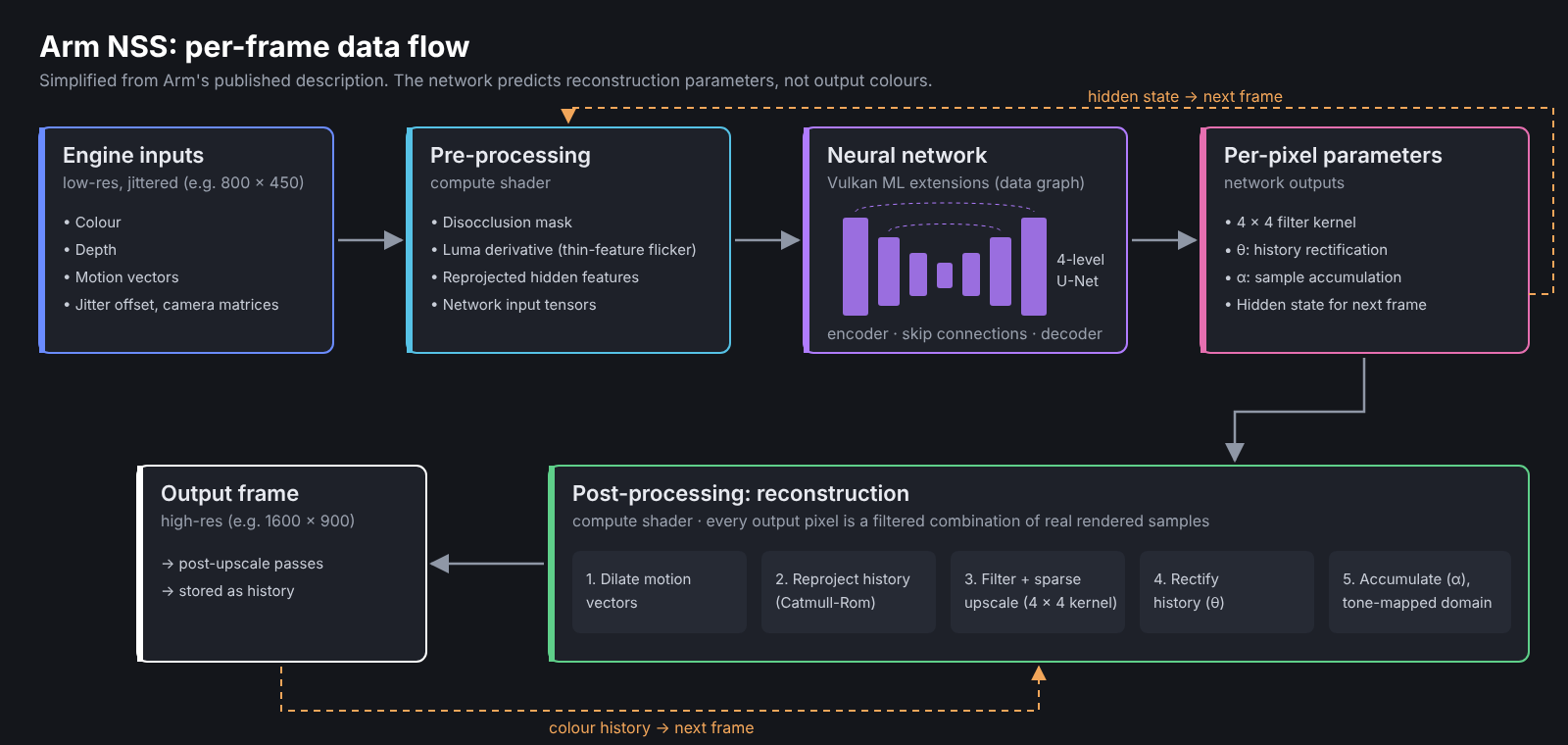
Predicting reconstruction parameters instead of the final image has several advantages. The final pixel is still reconstructed from real rendered samples. The network instead helps decide how those samples should be filtered and how much temporal history should be trusted at each pixel. It also reduces bandwidth requirements and makes the system more tolerant of quantization.
Arm trained NSS using sequences of around 100 frames rendered at 540p with one sample per pixel, paired with 16-sample-per-pixel 1080p reference images. Training is recurrent, and the loss considers both image quality in individual frames and stability over time. According to O'Neil (2025), this allows NSS to handle difficult content such as particles without requiring a reactive mask, while also improving stability on thin geometry and partially occluded objects.
The model weights are publicly available (Arm, 2025), and Arm's Model Gym can be used to retrain the model for project-specific content (Tallund, 2026b).
2.4Running NSS through Vulkan
On supported hardware, NSS inference runs through the ML extensions for Vulkan (Tallund & Marshall-Law, 2026). VK_ARM_tensors introduces tensor resources, while VK_ARM_data_graph allows a compiled neural network to be dispatched alongside normal graphics and compute workloads. The NSS model is distributed using Arm's VGF format and specialized for the target resolution when it is loaded.
Desktop GPUs do not currently implement these extensions directly. For development on Windows, Arm provides ML emulation layers that reproduce the Vulkan tensor and data-graph functionality on top of the existing driver (Arm, n.d.). The emulation layers are suitable for integration and image-quality testing, but not representative of performance on future mobile hardware, so performance is outside the scope of this article.
3.Integrating NSS into Unreal Engine 5.7
3.1Test configuration
| Component | Version |
|---|---|
| Unreal Engine | 5.7.4 |
| Arm Neural Graphics plugin | 1.1.0, originally targeting UE 5.6 |
| ML emulation layers | 0.11.0, Windows AMD64 |
| Vulkan SDK | 1.4.363.0 |
| Renderer | Vulkan, Shader Model 6 |
| Toolchain | Visual Studio 2022, MSVC 14.44, Windows SDK 10.0.22621.0 |
3.2Updating the plugin for Unreal Engine 5.7
At the time of testing, version 1.1.0 of Arm's Neural Graphics plugin targeted Unreal Engine 5.6 (Tallund, 2026a). To run it in 5.7.4, we created a small unofficial compatibility patch covering six source files. The main issue is that the plugin accesses several private Unreal render-graph and Slate types using wrappers that reproduce parts of the engine's internal class layouts. For 5.7.4, we:
- updated those class replicas to match the new engine layouts;
- adjusted the relevant private helper declarations and extended the supported-version check;
- updated the frame-interpolation presentation hook for its new 5.7 signature.
Frame interpolation remained disabled during our tests, but the module still needed to compile correctly. Because this patch depends on Unreal's private internals, it should be treated as a temporary compatibility fix. A successful build in 5.7.4 does not mean the same changes will work in later engine versions.
3.3Keeping the test focused
- Win64 only. The plugin is enabled on Win64 only, so it does not affect our existing mobile configurations.
- No frame interpolation. Neural frame-rate upscaling (NFRU), Arm's frame-interpolation system, is disabled. We wanted to test NSS on its own.
- Fixed resolution. Dynamic resolution is disabled so that every capture uses a known and repeatable input resolution.
- Unchanged renderer. The rest of the renderer stays unchanged, including Lumen, hardware ray tracing, Nanite, and the existing shading path.
3.4Making sure NSS is actually running
Enabling the plugin does not guarantee that NSS is producing the image. If initialization fails, for example because the Vulkan ML emulation layers are missing or loaded in the wrong order, Unreal falls back to its own temporal upscaler and the comparison is invalid.
For every configuration, we checked Unreal's temporal-upscaler visualization:
ShowFlag.VisualizeTemporalUpscaler 1
With NSS running at 50%, the overlay reports ThirdParty TemporalUpscaler: NSS with an 800 × 450 input and 1600 × 900 output. For the native reference, the overlay reports a 1600 × 900 input and output with NSS off. We also checked NSS's own debug output using r.NSS.Debug 1, which let us confirm that the neural inference path and its intermediate outputs were active.

4.How we compared the images
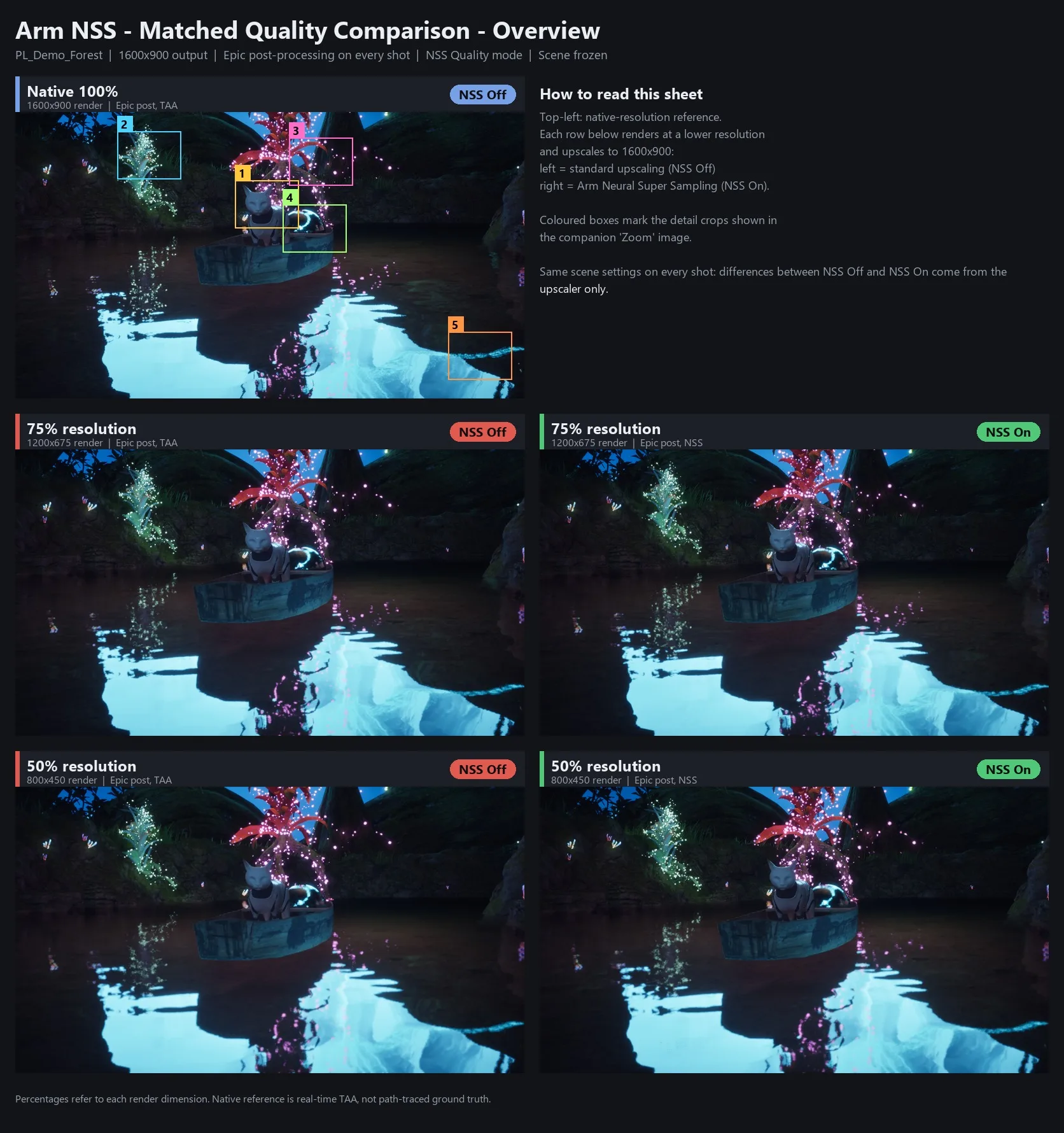
A visible difference between two screenshots might come from the upscaler, but it can also come from a different post-processing setting, anti-aliasing mode, camera position, or temporal history that has not yet stabilized. Each pair of images therefore differs in only one setting: whether NSS is enabled.
4.1What stayed the same
| Variable | Setting |
|---|---|
| Scene and camera | One fixed view of the cat in the boat, containing emissive foliage, particles, textured rock, water, and the reflective chrome sphere |
| Time | Game time frozen with slomo 0. Animations, particles, and water stop moving, but rendering continues, so the jitter sequence still advances and each upscaler keeps accumulating history |
| Temporal convergence | Several seconds of rendering after each settings change before taking the screenshot |
| Output resolution | 1600 × 900 window for all captures |
| Post-processing | Epic scalability and Epic post-processing (sg.PostProcessQuality 3) |
| Temporal path | Unreal's temporal path (r.AntiAliasingMethod 2) in every capture. With NSS off, Unreal's built-in temporal upscaling reconstructs the image; with NSS on, NSS takes over that step |
| NSS mode | Quality (r.NSS.ShaderQualityMode 0), which controls NSS shader quality and is separate from the render resolution |
4.2Capture matrix
| Capture | Input resolution | Native pixel count | Output | NSS |
|---|---|---|---|---|
| Native reference | 1600 × 900 | 100% | 1600 × 900 | NSS off |
| 75%, NSS off | 1200 × 675 | 56.25% | 1600 × 900 | NSS off |
| 75%, NSS on | 1200 × 675 | 56.25% | 1600 × 900 | NSS Quality |
| 50%, NSS off | 800 × 450 | 25% | 1600 × 900 | NSS off |
| 50%, NSS on | 800 × 450 | 25% | 1600 × 900 | NSS Quality |
Screen percentage applies to both image dimensions, so rendering at 75% means rendering 56.25% of the native pixels. At 50%, the renderer only produces 25% of the native pixel count: 360,000 pixels instead of 1.44 million.
4.3What we mean by "native"
The native reference is Unreal rendering at the full 1600 × 900 resolution with NSS off. It serves as a reference for how much detail the reconstructed images retain, but it is not true ground truth. The native image still contains temporal anti-aliasing and does not represent a path-traced or supersampled reference. A difference from native therefore means a difference from the full-resolution output of our real-time renderer, not from an ideal image.
4.4Looking at the details
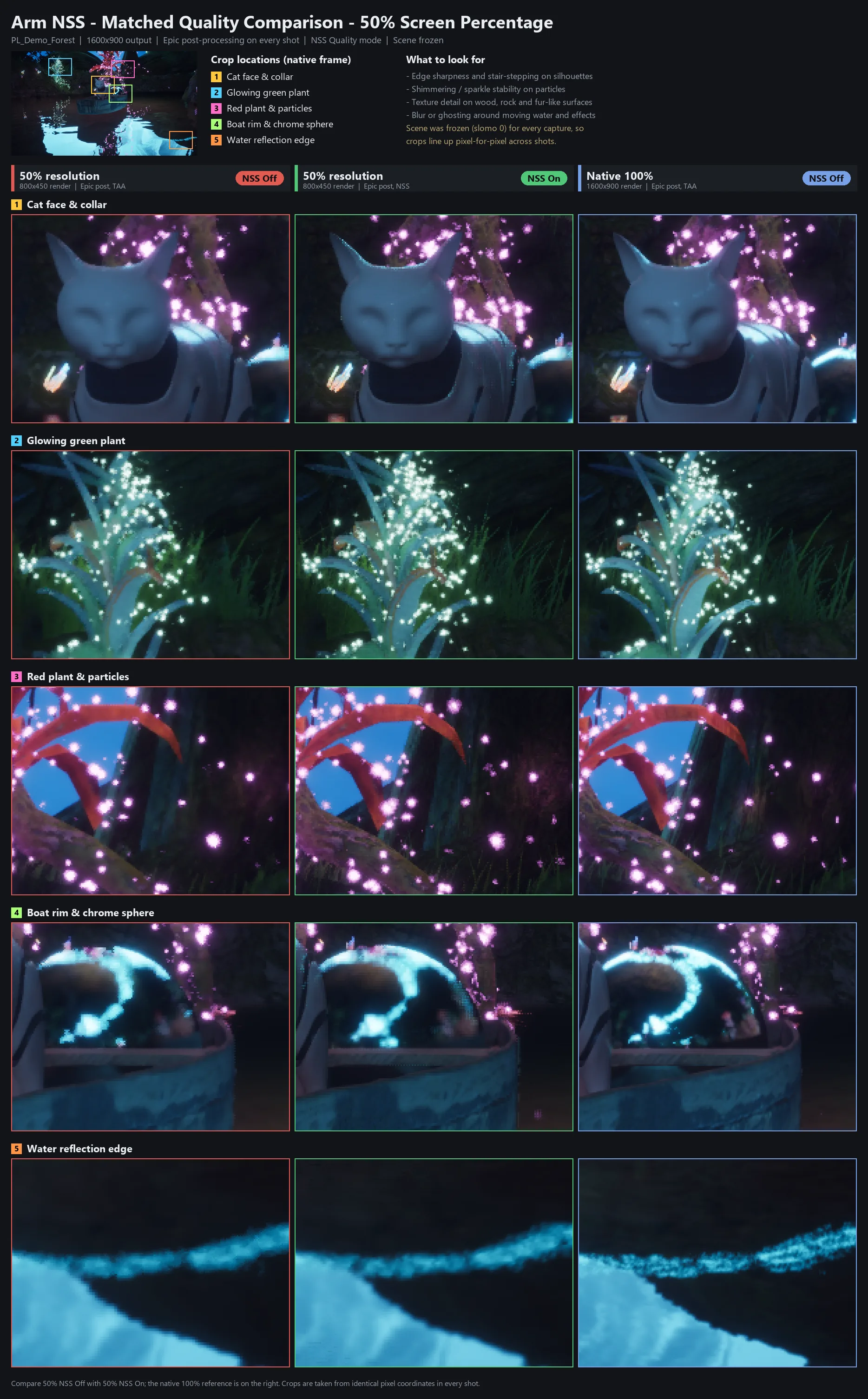
Most reconstruction differences are difficult to judge from a full screenshot, so the same five areas were extracted from each capture: the cat's face and collar, the green emissive plant, red foliage and particles, the boat rim and reflective sphere, and the edge of a water reflection.
Each crop is enlarged 3x using nearest-neighbour filtering, which keeps the reconstructed samples visible; a smooth scaling filter would hide the pixel-level differences under examination.
5.Results
5.1Emissive foliage
The green plant shows the clearest difference. At 50% resolution with NSS off, several of its small bright features blend together with the surrounding glow. The individual shapes become difficult to distinguish and the plant looks softer overall. With NSS, more of those features remain separated, which makes the structure of the plant easier to read.
Thin emissive geometry is difficult for temporal reconstruction: if a bright one-pixel feature is not sampled in the current low-resolution frame, a conventional neighbourhood-based clamp may decide that the bright value stored in history is an outlier and reduce it toward the colours around it. A learned reconstruction system has more information available when deciding whether that history should still be trusted. The red foliage and particle region shows a similar improvement, although the difference is less pronounced.
5.2Character detail
Around the cat, NSS gives the ears, collar, and shoulder more definition. These are mostly strong geometric silhouettes or high-contrast material boundaries, which give the reconstruction useful information to work with.
Facial detail behaves differently. Both reduced-resolution images remain softer than the native image, particularly in the low-contrast shading across the face. A sharp edge gives temporal reconstruction a strong signal, while a smooth gradient contains much less information in each individual sample.
5.3Reflections and water
Results for reflections are mixed. Some edges in the chrome sphere look more clearly defined with NSS, but the brightest reflected highlight does not match the native image exactly. The water also remains softer than native with NSS on and off, and some of its fine structure is lost.
Temporal reconstruction struggles with reflections because the motion of the reflecting surface does not necessarily describe the motion of the reflected image. Bright highlights also interact with NSS's tone-mapped accumulation, which is specifically intended to stop very bright samples from destabilizing the history. Because these tests use frozen frames, behaviour with moving reflections has not yet been evaluated.
5.4What changes at 75%
At 75% input resolution, the difference between NSS on and off becomes much smaller. At that resolution, each frame already contains 56.25% of the native pixel count, so conventional temporal accumulation has considerably more information to work with.
The advantage of the learned reconstruction becomes more visible at aggressive scaling ratios. For a mobile renderer, this is also the range where reducing the rendering resolution could recover the most GPU time, although this has not been measured yet.
5.5What we observed
| Region | NSS on vs. off at 50% | NSS on vs. native |
|---|---|---|
| Emissive foliage | Clearly better separation of small bright features | Close, but some fine detail remains missing |
| Character silhouette | Sharper ears, collar, and shoulder | Close around edges, but softer facial shading |
| Reflective sphere | Some edges sharper, but highlight shape changes | Visibly different |
| Water | Little or no clear improvement | Softer with less fine structure |
For this scene and camera view, enabling NSS Quality at 50% input preserves small emissive features and strong geometric silhouettes better than leaving it off. This is a scene-specific observation, not a general ranking across all content.
6.Performance
We have not measured NSS performance on target hardware yet. The Windows build uses Vulkan ML emulation, so its timings are not representative of mobile hardware with native neural acceleration. This article therefore covers image quality only. The next performance step is on-device profiling, where we can compare the cost of NSS with the rendering time saved by lowering the input resolution.
7.Limitations
- Emulated inference. The Windows Vulkan ML layers let us test whether the integration works and inspect its image quality, but they are not representative of performance on hardware with dedicated neural acceleration.
- The native image is not ground truth. The 100% reference still includes temporal anti-aliasing.
- No project-specific retraining. Arm's published NSS model was used as-is. Arm supports model retraining, and a model trained or fine-tuned on Magical Forest content could behave differently, particularly around its stylized emissive effects and reflections.
- Unofficial Unreal Engine 5.7 adaptation. The compatibility changes described here are our own patch, not an official Arm UE 5.7 release.
8.What we want to test next
- On-device performance. On suitable hardware, we will profile NSS with native Vulkan ML support and compare reconstruction cost against the rendering time saved at lower input resolutions.
- Other NSS quality modes. This test only used Quality mode. Balanced and Performance modes may offer more useful quality/performance tradeoffs for mobile hardware.
- Retraining. We plan to use Arm's Model Gym and data-capture tools to fine-tune NSS using Magical Forest sequences. Stylized emissive content is a defining feature of the demo, which makes it a strong candidate for project-specific training.
References
Arm. (n.d.). ML SDK for Vulkan. Arm Developer. Retrieved October 15, 2026, from https://developer.arm.com/mobile-graphics-and-gaming/ml-sdk-vulkan
Arm. (2025). Neural Super Sampling (NSS) [Machine learning model]. Hugging Face. https://huggingface.co/Arm/neural-super-sampling
O'Neil, L. (2025, August 12). How Neural Super Sampling works: Architecture, training, and inference. Arm Community. https://developer.arm.com/community/arm-community-blogs/b/mobile-graphics-and-gaming-blog/posts/how-arm-neural-super-sampling-works
Tallund, A. (2026a). Arm neural graphics playbook – Evaluate [Learning path]. Arm Learning Paths. https://learn.arm.com/learning-paths/mobile-graphics-and-gaming/neural-graphics-playbook-evaluate/
Tallund, A. (2026b). Fine-tune neural graphics models using Model Gym [Learning path]. Arm Learning Paths. https://learn.arm.com/learning-paths/mobile-graphics-and-gaming/model-training-gym/
Tallund, A., & Marshall-Law, J. (2026). Enable neural graphics using ML Extensions for Vulkan [Learning path]. Arm Learning Paths. https://learn.arm.com/learning-paths/mobile-graphics-and-gaming/vulkan-ml-sample/
Appendix: Reproducing the setup
This appendix summarizes the Windows setup we used to reproduce the captures.
A.1Vulkan ML emulation layers
- Install Vulkan SDK 1.4.321.0 or later. We used 1.4.363.0.
- Download the standalone Windows AMD64 ML emulation layers, version 0.10.0 or later. We used 0.11.0. Extract them to a permanent location. Use the standalone release rather than the binaries bundled with the plugin.
- Open Vulkan Configurator (
vkconfig-gui.exe) and create a configuration. Add the layers'binfolder, enableVK_LAYER_ML_Graph_EmulationaboveVK_LAYER_ML_Tensor_Emulation, and set the scope to Any Running Vulkan Executable. Keep Vulkan Configurator running while using Unreal.
A.2Plugin and SDK
- Copy the Neural Graphics 1.1.0 UE 5.6 plugin to
<Project>/Plugins/NG, then add the following plugin entry to the project descriptor:
{ "Name": "NG", "Enabled": true, "PlatformAllowList": ["Win64"] }
- If
Plugins/NG/Source/NG-SDKis empty, restore the SDK at the revision used by the release, including recursive submodules and Git LFS files. Enable Windows long paths if necessary. Copyngsdk_windows_x64.dlland.libtoPlugins/NG/Binaries/ThirdParty/PreBuiltNGSDK. - Make sure only one copy of the NSS plugin modules is installed. Even a disabled older copy can cause duplicate-module build errors.
A.3Unreal Engine 5.7 build
- Update six plugin source files for Unreal Engine 5.7.4. The plugin reads private engine types through layout replicas, so these must match the 5.7 class definitions:
FRDGBuilder_5_7_0.handFSlateApplication_5_7_0.h(inNGShared/Public): new replicas ofFRDGBuilderandFSlateApplication, taken from the 5.7.4 engine headers. Private barrier helpers that the replica cannot access are kept as declarations only.FFXRDGBuilderBase.handFFXSlateApplicationBase.h: include the 5.7 replicas and raise the unsupported-version guard to 5.8.NFRUCustomPresent.hand.cpp(inNFRU/Private): update thePresentoverride to the 5.7 signature, which now takes anIRHICommandContext&.
- In both target files, set:
DefaultBuildSettings = BuildSettingsVersion.V6;
IncludeOrderVersion = EngineIncludeOrderVersion.Unreal5_7;
- Build Development Editor / Win64. A warning about the optional missing
VkLayer_arm_NG.dllis expected and harmless. - Set Vulkan as the default Windows RHI. We used Shader Model 6. Restart the editor afterward.
A.4Baseline configuration
In Config/Windows/WindowsEngine.ini, begin with NSS disabled and the screen percentage set to 100%. NSS requires a screen percentage below 100%, and otherwise substitutes 50%, so NSS should be disabled when creating the native reference.
[/Script/NGSettings.NGSettings]
bNSSEnabled=False
bNFRUEnabled=False
NSSShaderQualityMode=Quality

[ConsoleVariables]
r.AntiAliasingMethod=2
r.TemporalAA.Upsampling=1
r.DynamicRes.OperationMode=0
r.NSS.Enable=0
r.NFRU.Enable=0
r.ScreenPercentage=100
sg.PostProcessQuality=3
A.5Launching and capturing
Launch the map in a 1600 × 900 standalone Vulkan window, then freeze game time with slomo 0:
UnrealEditor.exe MyProject.uproject /Game/Demo/Maps/PL_Demo_Forest `
  -game -vulkan -windowed -ForceRes -ResX=1600 -ResY=900
Switch between the capture configurations, allowing the temporal history to stabilize before each screenshot:
// Native reference
// Disable NSS before requesting 100%
r.NSS.Enable 0 | r.ScreenPercentage 100

// Reduced-resolution baseline
r.NSS.Enable 0 | r.ScreenPercentage 50

// NSS Quality
r.NSS.ShaderQualityMode 0 | r.NSS.Enable 1 | r.ScreenPercentage 50
Before capturing, verify the active reconstruction method with ShowFlag.VisualizeTemporalUpscaler 1. The panel should explicitly list NSS when it is active. Hide all diagnostics, then take the final screenshot with shot filename=<path>.png -nosuffix.
A.6Common issues
| Symptom | Fix |
|---|---|
| NSS is not listed at runtime | Check that Vulkan is the active RHI, the Graph emulation layer is loaded above the Tensor layer, screen percentage is below 100%, and temporal anti-aliasing and temporal upsampling are enabled. |
| "NSS Temporal Upscaler failed to create context" | NSS failed to initialize for that run. Check the Vulkan ML emulation-layer configuration. |
| The native reference is unexpectedly running at 50% | Disable NSS before changing the screen percentage back to 100%. |
| The first launch takes a long time | The initial shader compilation for this project is substantial. Later launches reuse the compiled shader cache. |